 |
| Coogo.biz › Replacement Laptop Batteries › Replacement for APPLE Laptop Batteries › MLL42LL A Battery |
54.5Wh Replacement Laptop Battery Compatible with APPLE MLL42LL A |
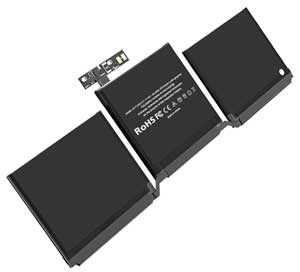
Click to Enlarge
Sale price: AU $ 77.28
|
|
| Type: Li-ion 54.5Wh |
| Volts:11.4V |
| Color:Black |
| Capacity:4781mAh |
| Dimension:mm |
| Condition: New |
| Shipping: Free shipping on all orders |
| Processing Time: Same day shipment for orders placed before 3 PM (UTC+8) |
| Warranty: Three years warranty covering manufacturing defects. |
| Money-Back Guarantee: Full refund within 30 days if unsatisfied, including the product price and shipping costs. Product must be returned in its original condition |
| Reusability: Rechargeable |
| Inventory: in stock |
| Sale Price: AU $ 77.28 |
|
|
|
Product Details
- Replacement for APPLE MLL42LL A Laptop Battery
- Product Type: Replacement Battery
- If your original part number or laptop model is not included in the compatibility list, our battery may still fit your laptop. Please feel free to contact us at order@coogo.biz for confirmation
- Located in: China
- Estimated Delivery Time: 7 to 12 business days worldwide.
Unique design and unparalleled quality, crafted for the discerning. Your patience will be rewarded with enduring excellence.
- How to purchase batteries correctly?
Method 1: You have to find your specific laptop model before ordering a correct battery.
How to check your laptop model?
Press [Win] + [R] , input "msinfo32" , then click "OK" to find your system model in the pop-up window.
Method 2: Take the battery out of your computer, confirm your original battery part number and appearance, compared with our battery image, make sure that's what you need.
|
Compatible para:
APPLE
A1708(EMC 3164), 020-00946, A1708(EMC 2978),
A1713, A1708,
Este producto reemplaza la batería original:
APPLE
MacBook Pro 13.3 inch Retina A1708(EMC 2978), MacBook Pro Core I7 2.4 13 inch A1708(Late 2016), MPXQ2LL,
MacBook Pro 13 inch A1708(Late 2016), MacBook Pro Core I5 2.0GHZ 13.3 inch Retina A1708(EMC 2978), MLL42LL,
MacBook Pro 13.3 inch Retina MLL42LL A, MacBook Pro Core I7 2.5 13 inch A1708(Mid-2017), MacBook Pro 13" A1708(Late 2016),
MacBook Pro Core I5 2.3GHZ 13.3 inch Retina A1708(EMC 3164), MLUQ2CH A, MacBook Pro Core I5 2.0 13 inch A1708(Late 2016),
MLL42CH A, MacBook Pro 13.3 inch Retina A1708(EMC 3164), MacBook Pro Core I7 2.4GHZ 13.3 inch Retina A1708(EMC 2978),
MPXQ2LL A, MacBook Pro 13 inch A1708(Mid-2017), MacBook Pro Core I5 2.3 13 inch A1708(Mid-2017),
MLL42LL A, MacBook Pro 13.3 inch Retina MPXQ2LL A, MacBook Pro Core I7 2.5GHZ 13.3 inch Retina A1708(EMC 3164),
|
|
Tips for Extending Battery Life
Cycle you battery
If you have a laptop with either NiCD or NiMH batteries fitted, allow them to go completely flat before recharging them. If you are going to use your laptop for extended periods of time on mains power remove your battery altogether and store it in a discharged state. Li-ion batteries are usually unaffected but we have seen that if you leave your laptop on mains power without cycling them then their useful life time is reduced substantially.
Screen
Turn the brightness and contrast-control down as far as you can stand it.
Turn off and/or Remove unneeded components
Turn off internal/external modems when not in use. Leaving your PC card modem plugged in can reduce your effective battery time by up to 25%. Remove PCMCIA cards when not in use.
Turn off AutoSave
This is somewhat risky, but if you’re careful to monitor your battery’s power level, you can avoid unnecessary disk accesses.
Disable helpers, wizards & other automatic features
Software functions that automatically format text, check spelling, and recalculate your spreadsheet all draw down power.
Use a disk-caching utility
Install a utility program like Norton Utilities or SmartDrive to cut down on disk-accessing time. The cache saves the most-often used or most recently used information to a special virtual memory cache. Then, instead of battery-depleting hard-drive accesses, the computer uses the information in the cache instead.
Clean Leads
Once a month, clean the leads (silver or gold metal strips on end of battery) with rubbing alcohol to ensure that your battery is making a good clean contact with the leads in your system.
Disclaimer:
All trademarks, logos, and brand names are the property of their respective owners. Coogo.biz is an independent supplier of aftermarket products and is not affiliated with, authorized by, or endorsed by any original equipment manufacturer (OEM). Our products are designed to be compatible with certain OEM devices/systems, but they are not OEM-original, genuine, or certified by the manufacturer. Customers are solely responsible for verifying physical, electrical, and functional compatibility prior to purchase and use. Note that the use of non-OEM parts may affect the manufacturer's warranty. We recommend consulting the OEM's warranty terms and/or a qualified professional before installation. Coogo.biz disclaims all liability for any damages, losses, or legal consequences arising from product installation, misuse, or incompatibility. |
Copyright © 2004-2025 COOGO.BIZ Inc. All Rights Reserved.
E-mail: order@coogo.biz |
|